
My 2nd Line Text Call Number
AutoBizLine, Inc.Communication
4.4767.00 Reviews
- Version
- 1.3.15
- Installs
- 1.00M
- Age Rating
- Everyone
Screenshots
Our Review of My 2nd Line Text Call Number
 Analysis by Appyee
I often see the need for a second number arrive in a very ordinary way: a side job starts attracting calls, a marketplace listing brings messages, or a new project makes it uncomfortable to hand out a personal number. My 2nd Line Text Call Number is built for that moment. It’s a communication app from AutoBizLine, Inc. that adds another line to a phone, aiming to keep those conversations apart without making you carry a second device. That is a useful idea, but it works best when you treat the extra line as a boundary to manage, not as a complete replacement for your regular phone service.
Begin with a clear reason for a second line
Before installing any second-number app, I’d decide what the new number is for and who will get it. That sounds simple, but it affects whether the setup stays useful. A number for customer inquiries should not become the number you give to every shop and signup form; a line for a temporary project may not be worth keeping as a permanent contact channel. A little separation at the start makes it easier to understand incoming calls and texts later.
The app is free to install, is rated for Everyone, and its current version is 1.3.03. It has a 4.6 average from around 21,000 ratings, with more than a million installs. Those figures suggest that the idea has broad appeal, but they don’t guarantee the experience will suit every carrier, location, or calling habit. I’d think of them as context, then judge the app against the job I actually need it to do.
Getting a second line into your routine
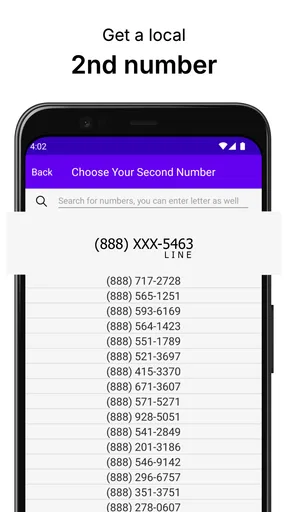
Alright, so the first thing you notice about My 2nd Line Text Call Number is just how easy it is to set up. I was pleasantly surprised by the straightforward installation process. You download the app, sign up with your existing number, and voilà, you're good to go! The interface is clean and intuitive, making it feel like a natural extension of your phone.
Once the line is ready, the most practical next step is to tell people exactly what it is for. For a small business, that might mean putting it on a booking page and using it only for customer contact. For a one-off sale, I’d keep the conversation in the app and avoid letting it spill into my main number. That habit is more important than any clever setup: it gives you a clean place to check, reply, and eventually stop responding when the workday ends.
My 2nd Line Text Call Number is free to download, but it also offers in-app purchases ranging from $0.99 to $399.99 per item. I would check the purchase details in the app before relying on a paid option, especially if I’m testing the service for a short project. A free download is an easy way to try the basic idea; it should not be read as a promise that every use or feature will stay free.
A Handy Addition to Your Phone
The central benefit is separation. Instead of giving customers, new acquaintances, or online sellers your everyday number, you can route those conversations through another line on the same phone. That is convenient, though it is not the same thing as having a second handset or a separate business phone plan. Your device remains the shared point of access, so notifications, battery use, and your own attention still need managing.
Calls, messages, and the handoff to real life
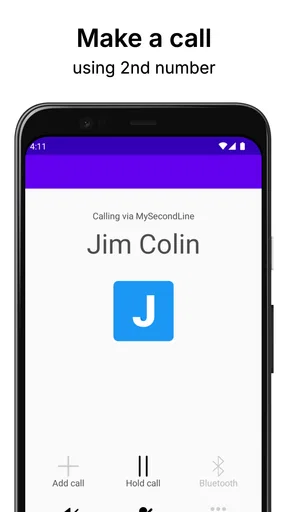
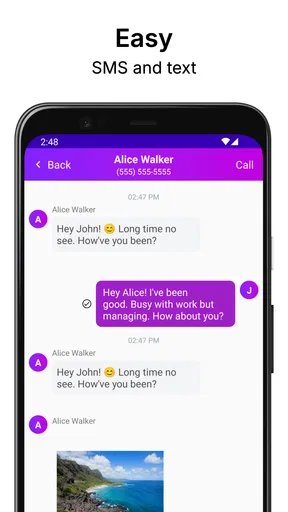
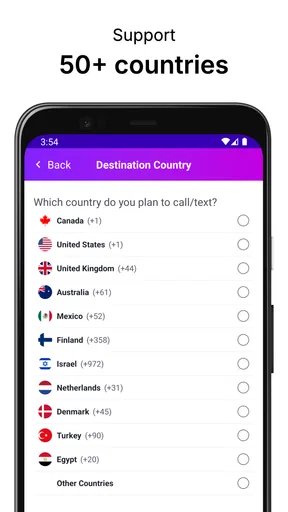
There are quite a few features that make this app stand out from the crowd. For starters, it offers unlimited calling and texting within the U.S. and Canada. So, if you're like me and have friends and family across the border, this feature is an absolute lifesaver.
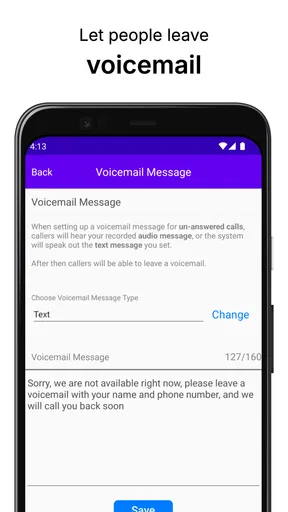
Moreover, the app allows you to customize your voicemail, which is a nice touch. I found this especially useful for business calls. You can record a professional greeting, making it clear to callers that they’ve reached your secondary line. The app also supports MMS, meaning you can send and receive pictures without a hitch.
That combination is particularly handy when a conversation moves from a short question to something that needs context. A customer might text a picture to explain a problem, then call to discuss timing; keeping both kinds of contact on the secondary line can make the exchange easier to follow. I’d still use a separate calendar or task list for appointments and promises. A communication line can hold the conversation, but it is not a substitute for a record of what you agreed to do.
There is also a social handoff to consider. If someone calls the second number and you call them back from your ordinary dialer by habit, you may expose your personal number and blur the boundary you meant to create. I’d make a deliberate routine of opening the app before returning a work call, and tell regular contacts to keep using the same channel. That small check can prevent the most common practical failure of a second line: using the wrong one when you are in a hurry.
Everyday use and the points to watch
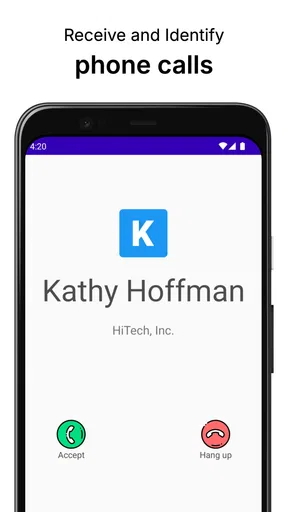
Using the app is super intuitive. The developers clearly put a lot of thought into making it user-friendly. The call quality is excellent, and I didn’t encounter any dropped calls during my testing period. Texts are delivered promptly, and the notifications work like a charm, ensuring you never miss an important message.
A realistic day might look like this: I post an item for sale in the morning, share the secondary number with interested buyers, and use its texts to arrange a pickup. If someone sends a photo or calls with a question, the conversation stays in that channel. After the exchange is finished, I can leave the line quiet rather than having future inquiries arrive on my personal number. That workflow is useful for occasional contact as well as a small side business, provided I remember to check the app when I’m expecting a reply.
One thing I did notice is that the app tends to consume a bit more battery than I expected. It’s not a deal-breaker, but something to keep in mind if you’re always on the go and away from a charger.
That battery trade-off matters most if you rely on the second line for time-sensitive calls. I’d test notifications during a normal day before printing the number on a sign or putting it on a customer-facing page. If the phone is in a battery-saving mode, has weak connectivity, or is left unattended, a separate app-based line may be less dependable than the primary number you already monitor. For urgent contact, I would keep a clear backup route rather than assuming every caller can reach me through the secondary line.
Privacy is also a habit
Privacy can be a concern with apps that handle your communication, but My 2nd Line Text Call Number takes it seriously. The app doesn’t bombard you with ads, and it promises not to sell your data. Plus, it offers encryption for your calls and texts, which is reassuring.
A second number can reduce how widely your main number circulates, but it does not make a conversation anonymous or remove the need to use good judgment. I would avoid sending sensitive personal information just because a chat is on a separate line. For a business, I’d also make sure the voicemail greeting does not reveal private details and that whoever helps answer messages knows which number they are using. The value here is a more manageable boundary, not a reason to stop thinking about privacy.
Who benefits, and who may prefer another option
Freelancers and Entrepreneurs
For those who run their own businesses, having a separate line is invaluable. It helps maintain professionalism without needing a second device.
Travel Enthusiasts
If you travel frequently between the U.S. and Canada, this app is perfect for you. It saves on those pesky international charges.
I’d also consider it for people arranging local services, managing a small event, or selling items online—situations where you want a contact number for a defined purpose without sharing the one friends and family already use. The useful distinction is that this remains an app-based workflow on your existing phone. If you need a company-managed phone system, several staff members answering the same line, or a number tied to a dedicated device, a conventional business plan or second SIM may be a better fit.
Compared with simply using your regular number, a second line gives you a cleaner way to sort conversations and decide which number to share. Compared with carrying a second phone, it avoids another device to charge and keep nearby. The compromise is that both lines depend on one handset and the app: you still need to notice its alerts, keep enough battery, and choose the right place to make a return call. If your priority is a strict work-life cutoff, switching off or setting aside a separate device can be more reliable than relying on personal discipline alone.
The app is available for both Android and iOS, making it accessible no matter which side of the smartphone divide you’re on. Its age rating is Everyone, but that rating is about suitability, not whether the service matches a particular business or privacy need. I’d also check that the app works comfortably on the device I plan to use before making the number part of an important workflow.
The Final Word
All in all, My 2nd Line Text Call Number is a solid choice for anyone in need of a second line. It’s reliable, easy to use, and packed with features that genuinely make life easier. Whether you're managing a side hustle, staying in touch with loved ones abroad, or just looking to keep your personal and professional lives separate, this app is worth a shot.
So, go ahead and give it a try. You might just find it becomes one of those apps you didn't know you needed until you had it!
Verdict
Strengths of My 2nd Line Text Call Number
- Easy setup process for quick access.
- Affordable pricing for premium features.
- Reliable call and text quality.
- Supports international numbers efficiently.
- User-friendly interface for all ages.
Limitations of My 2nd Line Text Call Number
- Limited customization options available.
- Ads can be intrusive in the free version.
- Requires internet for functionality.
- Occasional app crashes reported.
- Contact sync can be slow at times.
Similar Picks in This Category
View All
Google Messages
Google LLC4.6

Gmail
Google LLC4.1

Google Meet
Google LLC4.4

Google Chrome
Google LLC4.1

WhatsApp Messenger
WhatsApp LLC4.6

Carrier Services
Google LLC4.2
Frequently Asked Questions
What is My 2nd Line Text Call Number used for?
My 2nd Line Text Call Number provides users with a secondary phone number for texting and calling. This is particularly useful for maintaining privacy, managing business communications separately, or using for online services. It offers flexibility without needing a second physical phone.
How does My 2nd Line Text Call Number protect my privacy?
The app helps protect your privacy by allowing you to keep your personal phone number private. You can use the secondary number for situations where you don't want to share your main number, such as online transactions or temporary contacts.
Is My 2nd Line Text Call Number available for both Android and iOS?
Yes, My 2nd Line Text Call Number is available for both Android and iOS platforms. You can download it from the Google Play Store for Android devices or the Apple App Store for iOS devices, ensuring compatibility with a wide range of smartphones.
Are there any costs associated with using My 2nd Line Text Call Number?
While the app may be free to download, it often operates on a subscription model for full features. Users can typically choose from various plans based on their needs, including unlimited calling and texting options. Always check the app for the latest pricing details.
Can I use My 2nd Line Text Call Number internationally?
Yes, My 2nd Line Text Call Number can often be used internationally, allowing you to make and receive calls and texts while abroad. However, availability and functionality can depend on the region and local carrier restrictions. It’s advisable to verify these details before traveling.
